SMS Opt-In Documentation
This page documents how Bam Good Time obtains, records, and honors SMS consent from end users. All SMS messages are strictly transactional — no marketing or promotional messages are sent.
Last updated: February 13, 2026
Reviewer: Where Consent Is Collected
Every surface that collects SMS consent renders the same sentence from a single source file, so the wording shown below is the wording a member sees — on every club site, with no per-club and no per-page variation.
- Creating an account — the checkbox appears beneath the Phone field, once a phone number has been entered. This is the primary point of collection.
- Accepting a club invitation
- Joining a club from a share link
- Account settings — where a member turns texts on or off at any time. This is the surface pictured below.
All four sit behind sign-in, because each one is attached to a specific person’s account and phone number. There is therefore no anonymous URL that displays the opt-in, and we would rather say so than publish a walkthrough that cannot be completed. The screenshot below is the live form, and the sentence beside it is reproduced verbatim from the code that renders it. If you need a guided walkthrough on a live account, contact us at the address at the foot of this page and we will arrange one.
Live screenshot — SMS consent in account settings
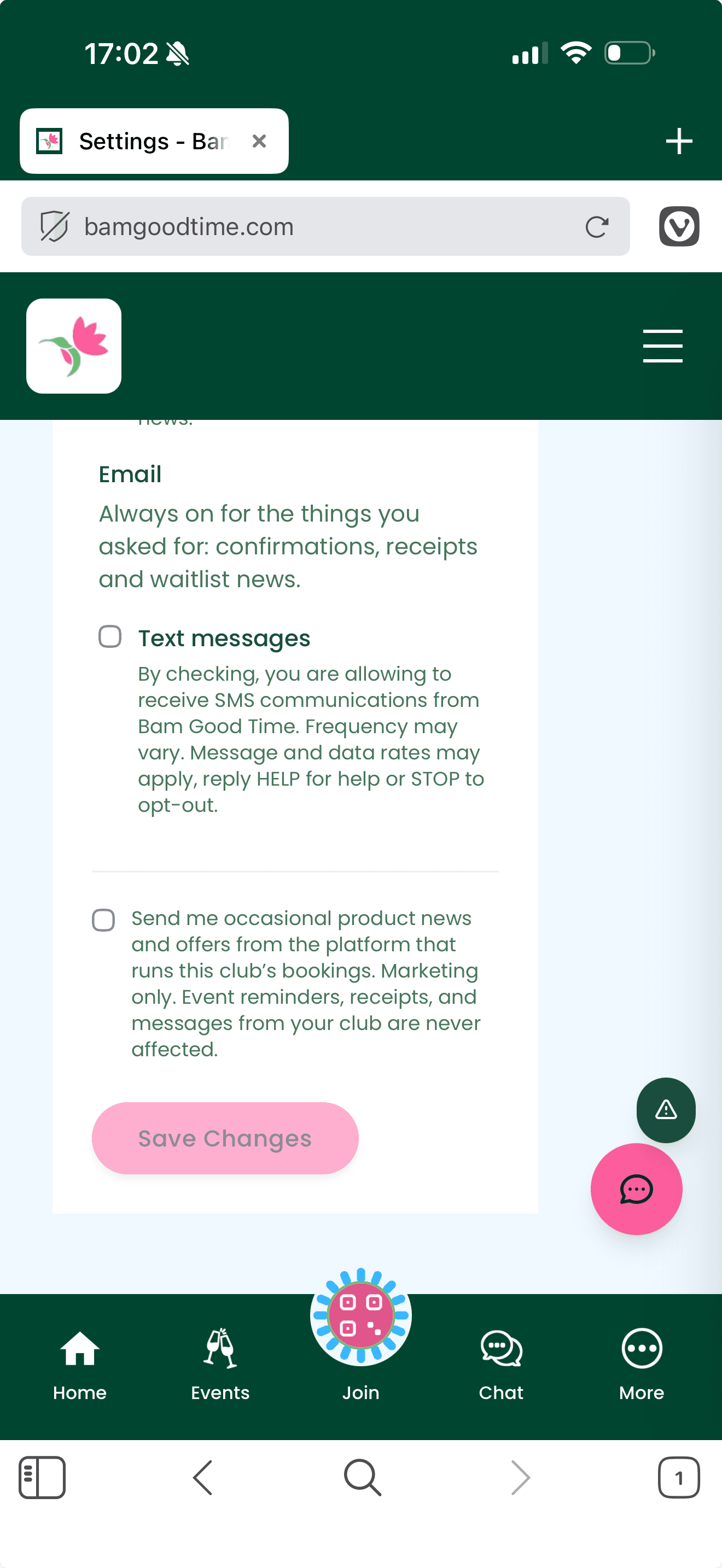
One checkbox, for SMS consent — unchecked by default and optional. It reads, verbatim: "By checking, you are allowing to receive SMS communications from Bam Good Time. Frequency may vary. Message and data rates may apply, reply HELP for help or STOP to opt-out." Nothing is gated on it — registration completes whether or not it is ticked, so consent is never a condition of creating an account.
1. Consent Mechanism: Registration Form
Every end user must complete a registration form before any SMS messages are sent. The form contains two separate checkboxes: an optional SMS consent checkbox (unchecked by default) and a required Terms/Privacy acceptance checkbox. Users may submit the form without opting into SMS. Below is the exact registration form as it appears to users:
Columbus Mahjong Club
What should we call you? (Leave blank to use first name)
Required for verification
At least 8 characters
Key Compliance Details
- ✓Two separate checkboxes: SMS consent (optional) and Terms/Privacy acceptance (required)
- ✓SMS consent checkbox is unchecked by default and optional — not required to submit the form
- ✓SMS opt-in text includes: brand name, frequency, data rates, HELP and STOP keywords
- ✓Links to Terms of Service and Privacy Policy with dedicated SMS sections
- ✓Consent timestamp recorded in database (
sms_consent_at)
2. Opt-In Flows
Flow A: Website Registration (Self-Signup)
User Visits Club Website
https://columbus.bamgoodtime.com) and clicks "Sign Up."Completes Registration Form
Optional SMS Consent
Phone Verification
Account Created
sms_consent: true and sms_consent_at: [timestamp] recorded. Only then are transactional messages enabled.Flow B: Club Invitation
Admin Sends Invitation
User Receives Invitation SMS
User Clicks Link & Registers
Same Consent Flow
Flow C: Bring-a-Friend Registration
Existing Member Registers a Friend
Friend Receives Notification
Friend Completes Registration
3. Sample Messages
All messages are transactional only. Every message includes the "Bam Good Time" brand name and "Reply STOP to opt out" instructions.
4. Opt-Out Mechanism
Standard opt-out keywords are supported and honored immediately:
Immediately opts the user out of all SMS messages. A confirmation is sent.
Re-subscribes the user to transactional messages after a previous opt-out.
Returns support information including the brand name and contact details.
5. Compliance Documentation
Full SMS disclosures are included in both our Terms of Service and Privacy Policy:
Terms of Service
Includes dedicated "SMS/Text Messaging Terms" section covering consent, message types, frequency, costs, opting out, and privacy.
View Terms →Privacy Policy
Includes dedicated "SMS/Text Messaging" section covering consent, message types, frequency, costs, opting out, and data sharing.
View Privacy Policy →6. Technical Implementation
SMS consent is tracked programmatically in our database:
| Field | Type | Description |
|---|---|---|
sms_consent | Boolean | Whether the user has explicitly opted in via the consent checkbox |
sms_consent_at | Timestamp | Exact date and time consent was recorded |
No SMS messages (beyond a single opt-in-bearing invitation) are sent to any user where sms_consent is not true.
Questions?
For any questions about our SMS practices, contact us at info@bamgoodtime.com or visit our Contact page.